

Introduction
Cross-platform testing has evolved from being a “nice-to-have” into a critical requirement in modern software development. Applications today are no longer confined to a single operating system. Instead, they are expected to function seamlessly across Windows, Android, iOS, and web platforms, delivering a consistent and high-quality user experience regardless of device or environment.
This growing complexity has forced organizations to rethink traditional testing strategies. Windows, once tested in isolation, is now integrated into broader cross-platform pipelines due to advancements in emulator technologies and modern frameworks such as WinUI, .NET MAUI, and Progressive Web Apps (PWAs).
Windows emulators have emerged as a powerful solution, enabling scalable, automated testing without the need for extensive physical infrastructure. Combined with cloud platforms, containerization, and CI/CD pipelines, they empower QA teams to simulate real-world environments, run parallel tests, and detect issues early in the development lifecycle.
Understanding Cross-Platform Testing
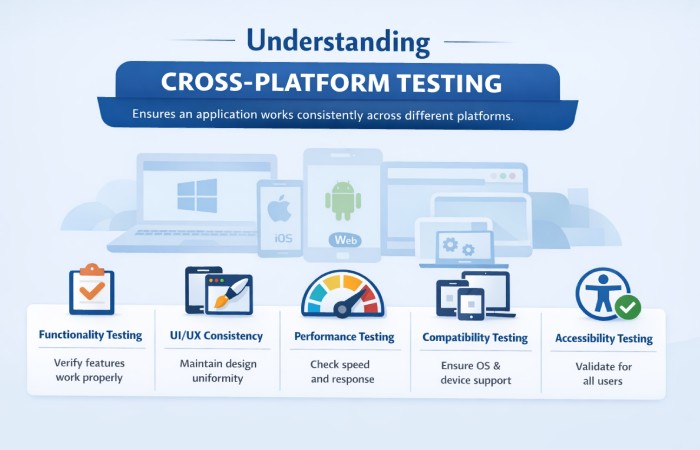
Cross-platform testing ensures that an application works consistently across different operating systems, browsers, and devices. It focuses on validating functionality, performance, usability, and UI behavior in diverse environments.
Key Aspects of Cross-Platform Testing
| Aspect | Description | Importance |
| Functionality Testing | Ensures features work correctly across platforms | Prevents platform-specific bugs |
| UI/UX Consistency | Maintains design uniformity | Enhances user experience |
| Performance Testing | Measures speed and responsiveness | Ensures smooth operation |
| Compatibility Testing | Checks OS, browser, and device compatibility | Expands user reach |
| Accessibility Testing | Validates usability for all users | Ensures inclusivity |
Cross-platform testing helps organizations avoid fragmentation, ensuring that users receive a uniform experience regardless of platform.
What are Windows Emulators?
Windows emulators are tools that simulate a Windows operating system environment on non-Windows platforms or virtual environments. They allow developers and testers to run Windows applications without requiring physical Windows machines.
These emulators can be categorized into two types:
Types of Windows Emulators
| Type | Description | Examples | Use Case |
| Compatibility Layer | Translates Windows API calls | Wine | Running lightweight apps |
| Full System Emulator | Simulates entire OS | VirtualBox, QEMU | Full OS testing |
| Cloud-based Emulator | Remote virtual environments | LambdaTest, TestingBot | Scalable testing |
| Commercial Compatibility Tool | Enhanced compatibility layer | CrossOver | Enterprise use |
Windows emulators replicate real environments, making them essential for testing legacy applications, desktop apps, and hybrid solutions.
Key Features of Modern Windows Emulators
Modern Windows emulators are highly advanced and offer capabilities that closely mimic real hardware and operating systems.
Feature Comparison
| Feature | Description | Benefit |
| Near-Native Performance | Optimized execution speed | Faster test cycles |
| Multi-Version Support | Supports legacy & latest OS versions | Better compatibility testing |
| Developer Tool Integration | Works with IDEs like Visual Studio | Easier debugging |
| Snapshot & Rollback | Save and restore states | Efficient debugging |
| Network Simulation | Simulates bandwidth, latency | Real-world testing |
| Hardware Simulation | Mimics sensors & devices | Accurate results |
| Containerization | Isolated environments | Consistent setups |
| Cross-Platform Support | Runs on macOS/Linux/cloud | Team flexibility |
These features significantly enhance testing efficiency and reliability.
Benefits of Using Windows Emulators
Windows emulators provide several advantages that make them indispensable for cross-platform QA.
Benefits Overview
| Benefit | Explanation | Impact |
| Cost Efficiency | Eliminates need for physical devices | Reduces infrastructure cost |
| Scalability | Supports parallel testing | Faster execution |
| Flexibility | Works across multiple platforms | Greater accessibility |
| Automation Support | Integrates with CI/CD pipelines | Continuous testing |
| Debugging Tools | Logs, screenshots, recordings | Faster issue resolution |
| Accessibility Testing | Supports inclusive design validation | Better compliance |
| Reduced Manual Effort | Automates repetitive tasks | Increased productivity |
| Community Support | Large ecosystem | Easy troubleshooting |
These benefits allow teams to deliver high-quality software faster and more efficiently.
Popular Windows Emulators and Testing Tools
There are several tools available for cross-platform testing using Windows emulators.
Tool Comparison
| Tool | Type | Key Features | Best For |
| LambdaTest | Cloud Platform | 3000+ environments, real devices, parallel testing | Scalable testing |
| Wine | Compatibility Layer | Lightweight, API translation | Running simple apps |
| VirtualBox | Virtual Machine | Full OS simulation | Complete Windows testing |
| TestingBot | Cloud Testing | Automation support, browser testing | Web app testing |
| CrossOver | Commercial Tool | Enhanced Wine, support | Enterprise users |
| Microsoft Remote IE | Cloud Service (Legacy) | IE testing on Azure | Web compatibility |
Deep Dive into Key Tools
LambdaTest
LambdaTest is an advanced cloud-based testing platform that enables both manual and automated testing at scale. It supports:
- Real-time cross-browser testing
- Parallel execution
- Integration with CI/CD pipelines
- Debugging tools like logs and video recordings
It is particularly useful for testing Windows environments without maintaining local infrastructure.
Wine
Wine is an open-source compatibility layer that allows Windows applications to run on Unix-like systems.
| Feature | Details |
| Type | Compatibility Layer |
| Performance | High (no full OS emulation) |
| Limitation | Compatibility varies |
| Best Use | Lightweight applications |
VirtualBox
VirtualBox provides full virtualization, enabling users to run complete Windows systems.
| Feature | Details |
| Type | Full Emulator |
| Resource Usage | High |
| Flexibility | Supports multiple OS |
| Best Use | Full environment testing |
TestingBot
TestingBot offers cloud-based automated testing for web applications.
| Feature | Details |
| Framework Support | Selenium, Cypress, Appium |
| Testing Type | Manual + Automated |
| Strength | Cross-browser testing |
CrossOver
CrossOver enhances Wine with a more user-friendly interface and support.
| Feature | Details |
| Type | Commercial |
| Support | Professional |
| Use Case | Enterprise environments |
Techniques for Seamless Cross-Platform Testing
Effective cross-platform testing requires a combination of tools, strategies, and best practices.
Use Cross-Platform Testing Frameworks
Frameworks enable a single codebase for testing multiple platforms.
| Framework | Supported Platforms | Advantage |
| Appium | Android, iOS | Open-source, flexible |
| Detox | Mobile apps | Fast execution |
| Flutter Integration Test | Flutter apps | Native integration |
| Xamarin.UITest | Cross-platform apps | Microsoft ecosystem |
Create a Test Matrix
A test matrix ensures coverage across multiple configurations.
| Parameter | Examples |
| OS Versions | Windows 10, 11 |
| Devices | Desktop, Tablet |
| Screen Sizes | HD, 4K |
| Browsers | Chrome, Edge, Firefox |
Use Cloud-Based Emulator Services
Cloud platforms eliminate infrastructure overhead.
| Service | Key Benefit |
| Firebase Test Lab | Android testing |
| AWS Device Farm | Large device pool |
| LambdaTest | Cross-platform testing |
Simulate Real-World Scenarios
Testing should reflect actual user conditions.
| Scenario | Purpose |
| Low Network | Test resilience |
| GPS Location | Location-based features |
| Battery Conditions | Performance impact |
| Interruptions | App stability |
Parallel Testing
Parallel execution significantly reduces testing time.
| Approach | Benefit |
| Test Sharding | Faster execution |
| Multi-device Testing | Better coverage |
| CI Integration | Continuous feedback |
Logging and Monitoring
Detailed logs help diagnose issues effectively.
| Tool | Function |
| Logs | Error tracking |
| Screenshots | Visual debugging |
| Video Recording | Replay failures |
Maintain Test Suites
Regular updates keep tests relevant.
| Activity | Benefit |
| Refactoring | Cleaner code |
| Removing obsolete tests | Reduced maintenance |
| Consolidation | Efficiency |
CI/CD Integration for Emulator Testing
Integrating emulators into CI/CD pipelines ensures continuous testing.
CI/CD Configuration Table
| Platform | Configuration Requirement |
| GitHub Actions | Android SDK setup |
| GitLab CI | Virtualization support |
| Jenkins | Pre-configured runners |
Best Practices
- Use caching for faster builds
- Automate emulator startup
- Include readiness checks
- Integrate test reporting
Handling Test Flakiness
Test flakiness is common in emulator-based testing.
Causes and Solutions
| Issue | Cause | Solution |
| Timing Issues | Slow emulator response | Add waits |
| Race Conditions | Parallel execution | Synchronization |
| Environment Instability | Resource limits | Retry mechanism |
| External Dependencies | API delays | Mock services |
Separating unit, integration, and UI tests also improves reliability.
Future of Cross-Platform Testing with Windows Emulators
The future of testing is driven by:
- AI-powered test automation
- Cloud-native testing environments
- Real-device and emulator hybrid testing
- Shift-left testing approaches
Windows emulators will continue to evolve, offering better performance, deeper integrations, and more realistic simulations.
Conclusion
Seamless cross-platform testing with Windows emulators is no longer optional—it is essential for delivering modern applications. By leveraging advanced tools, automation frameworks, and CI/CD pipelines, organizations can ensure consistent performance across platforms.
Windows emulators provide a scalable, cost-effective, and flexible solution for testing desktop and hybrid applications alongside mobile and web platforms. When combined with best practices such as parallel testing, real-world simulation, and continuous monitoring, they significantly enhance software quality.